
Scaling recipes with AI
What it does
Doubling a recipe is easy; taking a recipe that serves 12 up to 50 (or down to 4) by hand is fiddly and error-prone. AI Scale does the maths for you and returns a kitchen card:
- every ingredient re-quantified for the new size,
- the new total ingredient cost, and
- short baker notes on what changes beyond the numbers.
Where to find it
Open any recipe (Recipes → a recipe → View) and click AI Scale in the top-right, next to Edit.
How to scale a recipe
You can scale two ways — pick whichever you think in:
- Scale to a total — type the batch size you want (for example, 50). The dialog shows what the recipe currently makes (e.g. "This recipe currently makes 12 servings") so you always know what unit your target is in.
- Multiply by × — type a multiplier directly (2 for double, 0.5 for half). Handy when a recipe has no set yield.
Enter your number, click Scale, and the card appears in a moment.
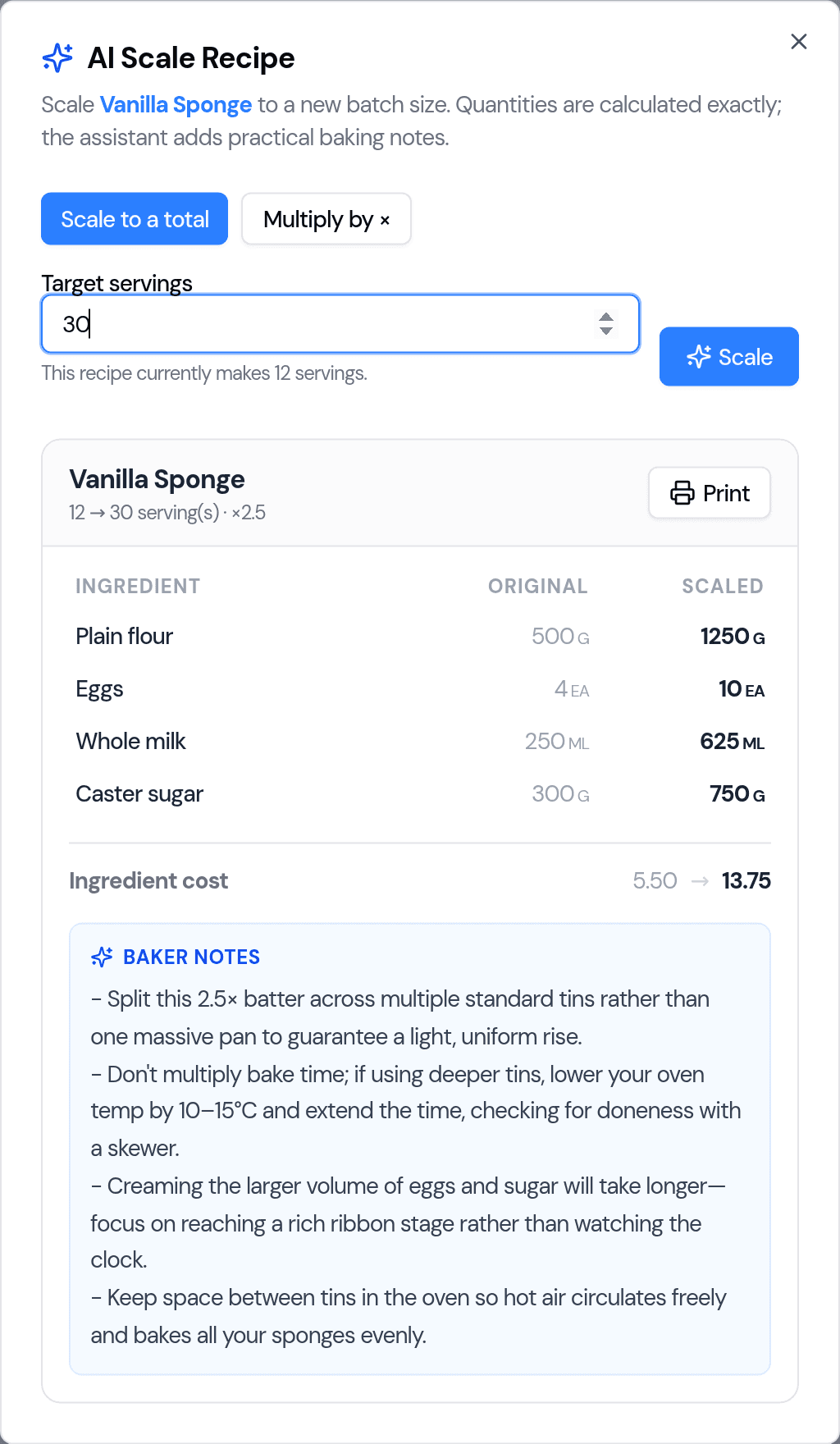
Reading the kitchen card
The card lists each ingredient with its original amount beside the scaled amount, then the ingredient cost before and after. At the bottom you'll find the baker notes.
A few things it handles for you:
- Whole pieces are rounded sensibly. Things counted in single pieces — eggs, for instance — are rounded to a whole number (16.8 eggs becomes 17) and flagged as rounded, because you can't crack part of an egg.
- Grouped units stay exact. Amounts in dozens, packs or boxes keep their fraction (2.5 dozen stays 2.5 dozen = 30), so nothing is over-added.
- Cost tracks the true amount, so your cost-per-unit never drifts as you scale.
Baker notes — what doesn't scale in a straight line
The most useful part. Ingredients scale linearly, but baking doesn't, so the assistant flags the things experience teaches you to watch:
- Bake time and temperature — a bigger, deeper batter usually needs a lower temperature for longer; don't just multiply the time.
- Split the batch — often better to bake across several tins or trays than one huge pan.
- Leavening — baking powder/soda sometimes needs easing back at large scale.
- Salt, spices and extracts — scale them, but taste-check.
- Rounded items — a heads-up wherever a count was rounded to a whole unit.
Print it for the kitchen
Click Print on the card to open a clean, printable version — the scaled ingredient list and notes — to pin up by the oven.
Good to know
- It's advisory — AI Scale gives you a card to work from; it doesn't overwrite your saved recipe or create a new one. (To save a scaled copy, use the recipe's own Scale Recipe tool.)
- No yield set? Use Multiply by × instead of a target, or add a yield to the recipe first (see Recipes, ingredients and supplies).
- Your data — the same privacy posture as the rest of the Assistant: your details aren't used to train outside AI models. See Your AI Assistant (beta).
Tips
- Scale to a total is the quickest when a customer asks for "enough for 50".
- Read the baker notes before a big batch — they're where the costly mistakes hide.
- Double-check any ingredient marked rounded if precision matters for that bake.
Last updated August 5, 2026