
How do I add a credit card surcharge?
Why not just add it as a tax rate?
Because a tax is never charged on top of another tax — no tax authority charges tax on tax. So if the items on your order already carry their own tax rate, a second rate added at order level has nothing left to land on, and your surcharge comes out at 0.00 or a few cents of the delivery charge.
That is the single most common reason a card fee stops working. Marking the rate as a fee fixes it, because a fee is charged on everything rather than on the untaxed part.
There is a second reason, and it matters at tax time. Your tax report totals the tax you collected on the government's behalf. A card surcharge is your own income, not tax you are holding for anyone — so counting it as tax means paying tax on money you never collected as tax.
Set it up
Go to Settings → Tax, add a rate for your surcharge, and tick This is a fee, not a tax. The tax options disappear, because none of them apply to a fee.
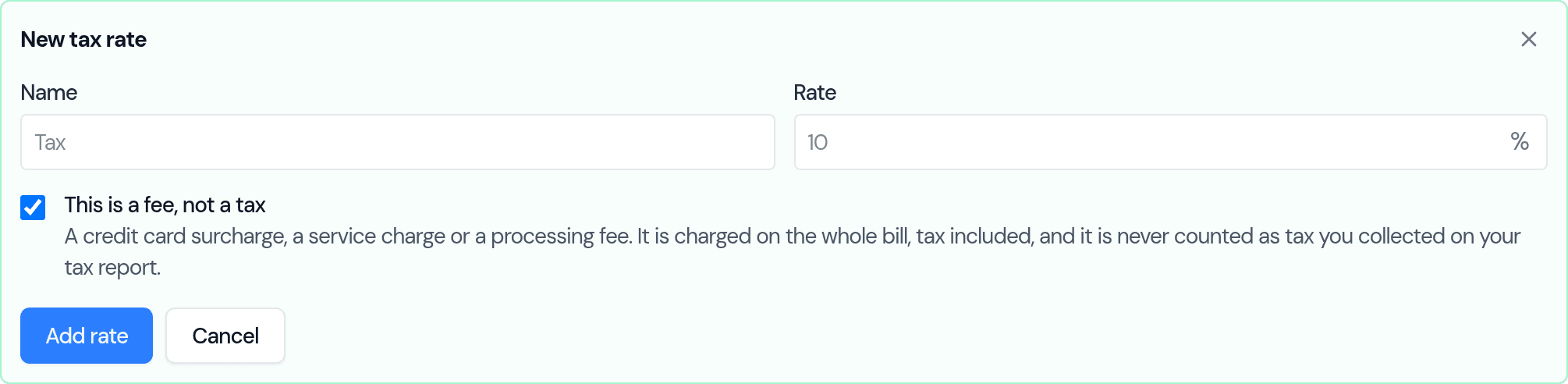
That is enough to pick it on any order. If you charge it on most orders, you can also have Bake Boost add it for you — see Charge a card fee without it counting as tax.
What it looks like
On the order, the fee sits on its own line under the tax and delivery:
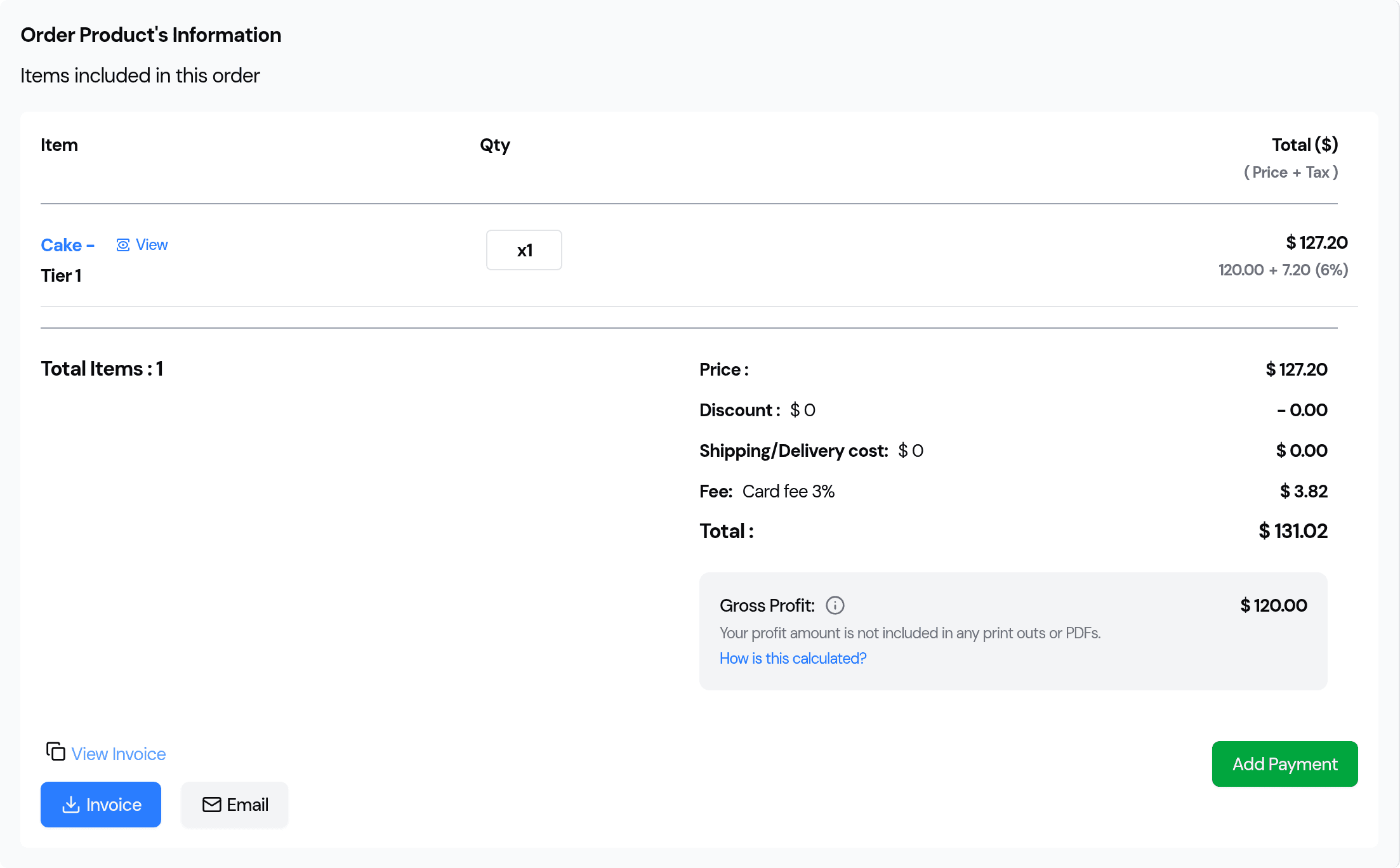
The cake is 120.00, its 6% Sales Tax adds 7.20, and the 3% surcharge is charged on the 127.20 the customer actually pays — 3.82, not 3.60. Your customer sees the tax and the fee as separate lines on the invoice, so nobody has to guess what they are paying.
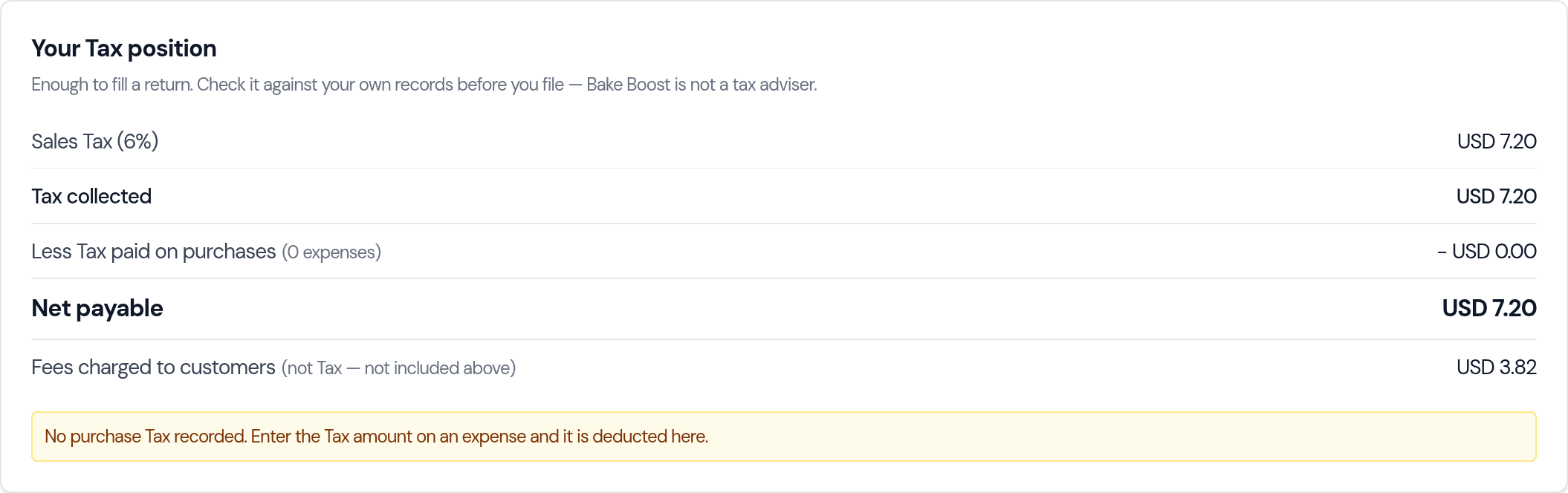
And on your Tax Summary, the fee is reported apart from the tax and left out of what you owe:
Related
- Charge a card fee without it counting as tax — the full guide, including adding the fee to card orders automatically.
- How do I add tax (VAT or GST) to my invoices?
- Connecting a payment gateway
Related questions
- Why is my credit card fee charging 0?
- Because it is set up as a tax rate rather than a fee. A tax is never charged on top of another tax, so if your items already carry their own tax rate, an order-level rate has nothing left to land on. Open Settings → Tax, edit the rate and tick "This is a fee, not a tax" — a fee is charged on the whole bill instead.
- What is the difference between a fee and a tax in Bake Boost?
- A tax is charged on the goods and is reported as tax you collected. A fee — a card surcharge, service charge or processing fee — is charged on the whole bill including tax and delivery, gets its own line on the invoice, and is never counted as tax you collected.
- Does a card surcharge count as tax I owe?
- No. A surcharge is your own income, not tax held for the revenue authority, so it is kept out of Net payable on the Tax Summary. It is still reported there, on a separate line marked "not included above", so the figure is not missing from your records.
- Can I charge a card fee on some orders only?
- Yes. The fee appears in the rate box in the order totals like any other rate, so you can add it or remove it on any order before you send it. If you turn on the automatic card fee, it is added to new card orders only and never touches an order you have already sent.
- Is my card surcharge itself taxable?
- That is a question for your own accountant or tax authority — Bake Boost is not a tax adviser, so it does not decide for you. A fee is added after the tax and is not itself taxed, which reproduces what most bakers were charging before.
Last updated September 27, 2026