
Prep timeline: when to start each step
Why it helps
Some bakes are a multi-day chain. A sourdough due Saturday morning needs its levain going the day before, an overnight proof, and an early bake. If you only see "make sourdough Saturday," you've already missed the start. The prep timeline breaks each batch into dated, timed steps so nothing needs starting earlier than the board shows.
1. Give a product its stages (once)
A stage template is the recipe's chain of steps. You set it up once per product.
- On the production board, expand a batch (Prep timeline → Stages), or open it from the batch.
- Add each step in order — for example Mix → Bulk ferment → Shape → Proof → Bake → Cool → Decorate → Pack. For each step set:
- Hands-on (min) — active work (mixing, shaping, decorating). This feeds your daily labour total.
- Passive (hrs) — the wait that stretches the timeline (proving, baking, cooling). Nobody's working, but the clock is.
- Gap (hrs) — any extra wait before the next step starts.
- Station — prep, bake, decorate or pack.
- In a hurry? Add starter chain drops in a typical prep→bake→cool→decorate→pack set you can tweak.
2. Generate the timeline for a batch
On the board, expand a batch and press Generate. The planner walks the stages backwards from the order's delivery date and lays each one on the day and rough time it needs to happen.
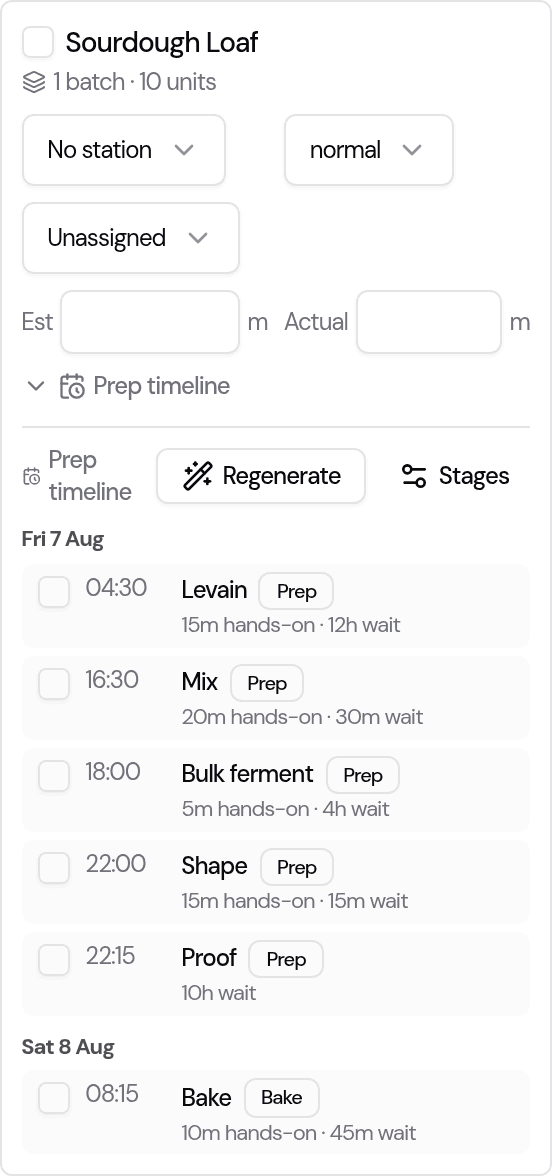
The steps are grouped by day with a rough start time, so walking in each morning you can see exactly what has to be started that day for orders due later in the week.
3. Closed days are handled for you
If a step would land on a day you're closed (from your blocked dates or weekly opening days), the planner moves that step earlier to your nearest open day and flags it as shifted — so you're never told to bake on a day you're shut. It never moves the customer's delivery date; only the prep shifts.
4. Adjust and it sticks
The timeline is a smart starting point, not a straitjacket. Tick steps done as you go. Change a step and it's marked edited — and your edit survives a regenerate, so if the delivery date changes and you re-run the timeline, your hand-tuned steps stay put while the rest recompute.
Good to know
- Order batches only. Ad-hoc items you add by hand don't have a delivery date to work back from, so they don't get an automatic timeline.
- No template yet? A batch simply shows no timeline until you add its stages — nothing else changes.
- Times are a guide. Start times are rough blocks to plan around, not alarms.
Tips
- Set templates for your slowest, multi-day bakes first — that's where starting late hurts most.
- Put realistic passive times in (a 12-hour cold proof is 12 hours) — that's what pushes a step onto the day before.
- Read the board first thing: today's group is your "start now" list.
Last updated August 5, 2026