
Your dashboard
Open Dashboard from the top of the sidebar.
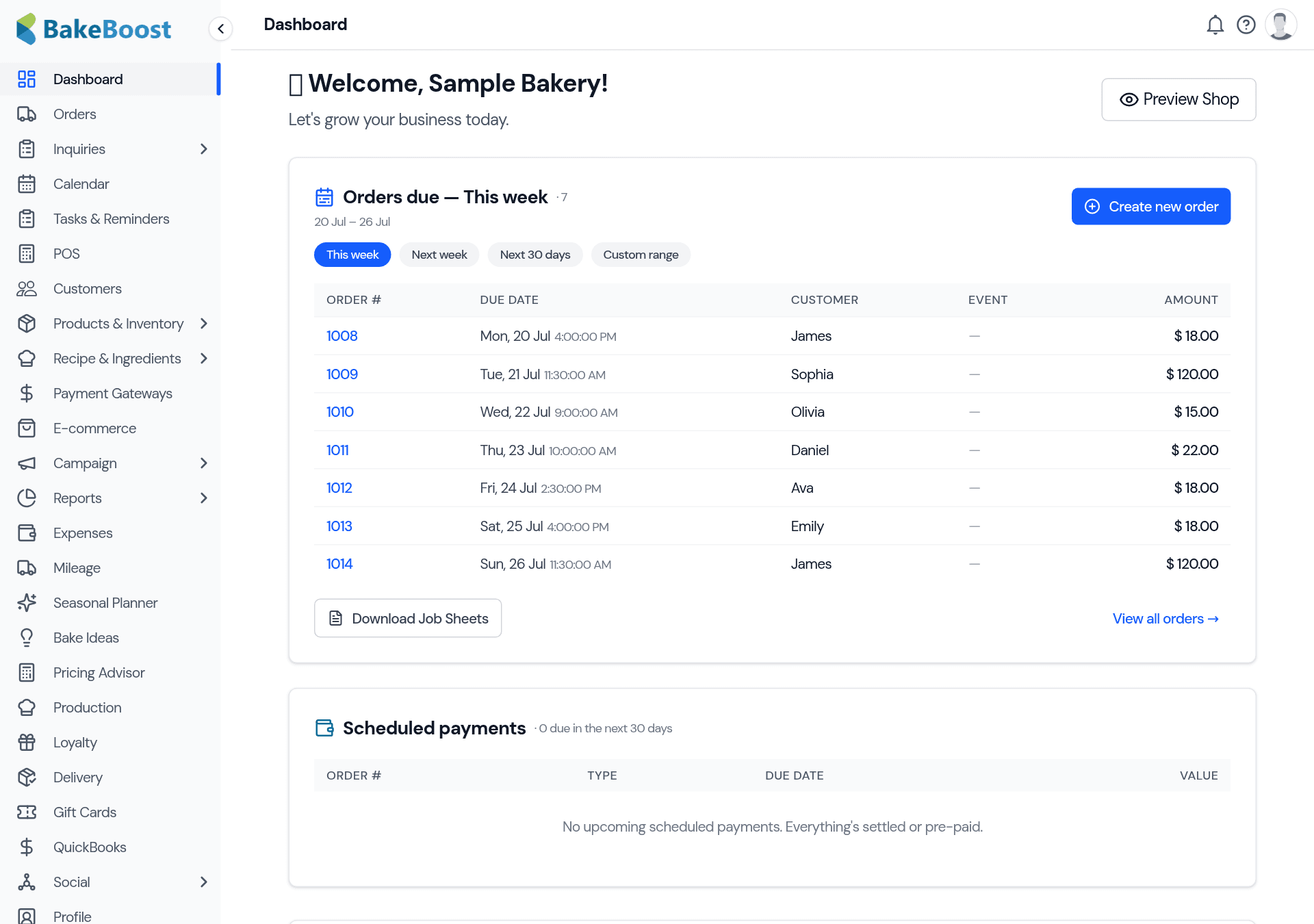
What's on it
- Orders due — the orders coming up, with quick tabs for this week, next week, the next 30 days, or a custom range. Each row shows the customer, the event date and the amount, so you can see the week's workload at a glance. Download Job Sheets for the range right from here.
- Scheduled payments — deposits and balances due soon, so you know what money is coming in (and what to chase).
- Getting started — when you're new, a checklist walks you through the first steps (add your products, take an order, set up your storefront) so you're not staring at a blank screen.
- Preview Shop — jump straight to your storefront to see what customers see.
Make it your starting point each day
A good daily rhythm: open the dashboard, glance at orders due this week to see what's ahead, check scheduled payments for anything to collect, then dive into the day. Everything on the dashboard is a shortcut — click an order to open it, or a panel to go to the full list.
Good to know
- It answers "what's next?" Orders due and payments due, front and centre.
- Change the window. This week, next week, 30 days, or a custom range.
- New here? Follow the checklist. Getting started walks you through setup.
- Everything's a shortcut. Click through to the order, list or storefront behind each panel.
Last updated July 24, 2026